 NudgeLater
Remind yourself of a link later on Android, in two taps
Links turn up at bad moments. A long video during a meeting, a recipe on the train, a product page you cannot compare right now. Leaving the tab open is a bet that you will run into it again, and most of the time you don’t.
A reminder that returns at a time you picked is a safer bet, and setting one takes two taps after the Share button.
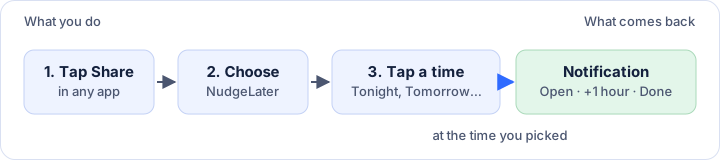
Setting it up
Tap Share in whatever app you are using. Chrome, YouTube, Reddit, Maps and most chat apps have one. Choose NudgeLater in the list, and a sheet slides up with a handful of times. Tap one. The sheet closes, a short confirmation with an Undo button appears, and you are back in the app you left.
There is no title field and no Save button, on purpose: every extra step is one more chance to give up on the capture.
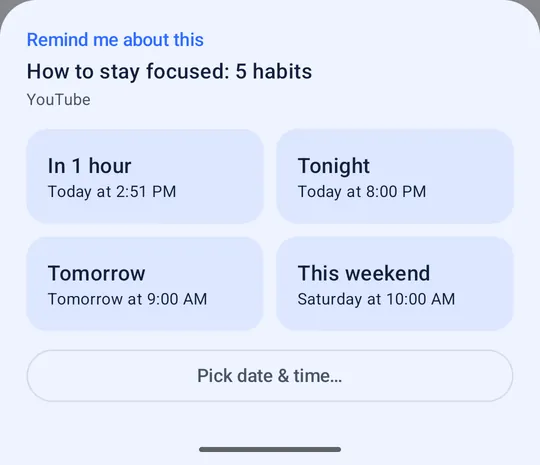
What the times mean
- In 1 hour is one hour from now.
- Tonight is 20:00 unless you changed it. When 20:00 is less than 30 minutes away the button disappears, so you cannot pick a time that would fire almost immediately.
- Tomorrow is 09:00 by default.
- This weekend is Saturday at 10:00. On Sunday, or once that Saturday slot is less than 30 minutes away, the button reads Next weekend and points to the following Saturday.
- Pick date & time opens a date picker and then a time picker, for everything else.
The two hours you are likely to want to change, Tonight and Tomorrow, live in Settings.
When the time comes
The notification says “You wanted to come back to this” and shows the page title and the app it came from. It has three buttons.
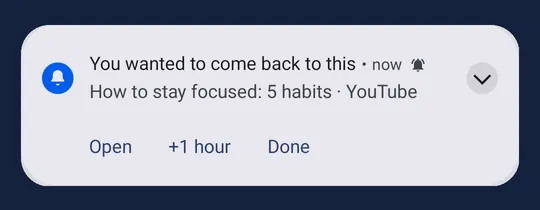
Open takes you to the link. +1 hour pushes it back by an hour (Pro lets you change that length). Done clears it for good.
If what you shared was plain text instead of a link, the buttons are Copy, Share and Done, with no snooze.
Changed your mind?
Undo in the confirmation removes the reminder straight away. Later on, the Upcoming tab lists everything scheduled under Today, Tomorrow and Later. Tap an entry to move it to another time or delete it, or swipe it away.
Two things that trip people up
Notifications have to be allowed for any of this to work. NudgeLater asks for the permission during a short first-run demo rather than the moment you open the app, and if you said no, you can switch it on in Android’s app settings.
By default, reminders use Android’s battery-friendly scheduling, so one can land a few minutes after the chosen time. If the exact minute matters to you, turn on Precise reminders in Settings; Android will send you to the screen where that permission lives.
Next
If NudgeLater is buried on the second page of your share sheet, you will stop using it. Pinning it to the top fixes that.
Try it on your phone
NudgeLater is free, takes two taps, and keeps everything on your device.