 NudgeLater
Reminder apps with an account, and without: what changes
Most apps ask you to sign in. Some reminder apps don’t, and they say so loudly. Both choices have a cost that is easy to miss from a store page.
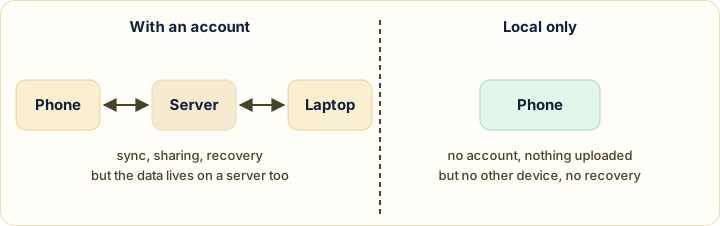
What an account gives you
- Sync between phone, tablet and computer.
- Recovery: lose the phone, sign in on a new one, and it is all there.
- Sharing a list with someone else.
- Integrations, such as Google Tasks creating a task from a Gmail message.
Google Keep and Google Tasks are the obvious examples. Their Play listings describe syncing across your devices, and both data safety sections say the apps may collect several data types. That is not a criticism, since sync cannot work without keeping your data somewhere. It is the mechanism.
What staying local gives you
- Nothing to create. Install, share, done.
- Less to leak. A saved link can say a lot: a health question, a job listing, a gift. If it never leaves the phone, there is nothing to breach and no company can read it.
- No dependency. No account to lose, no service that might shut down.
Not every “local” app is identical. One Remindly on Google Play (com.alex.remindly, by Alexandre Vinson) describes itself as offline, with no account and no cloud, and also lists ads and in-app purchases. NudgeLater keeps everything on the device and sends no content anywhere, apart from anonymous usage and crash reports that you can switch off in Settings. Each of these is the developer’s own statement, so verify it for any app you rely on.
What staying local costs
- One phone. Your reminders don’t appear anywhere else.
- A new phone starts empty. NudgeLater sets
allowBackupto false, so Android’s automatic backup does not carry the reminders across. - No shared lists.
For a reminder that fires tonight, or on Saturday, the second point rarely matters, because it will have fired before you change phones. For a list you plan to run for a year, it matters a great deal.
Which one for what
| If you… | Lean towards |
|---|---|
| Work across phone and laptop | An account |
| Share lists with family or colleagues | An account |
| Keep something that should survive a lost phone | An account |
| Save personal links you would rather not store anywhere else | Local |
| Just want to install and use | Local |
| Set reminders for hours or days ahead | Either works; local is simpler |
Checking any app in three minutes
- Read the Data safety section of its Play listing. It is what the developer declares, not an audit.
- Ask what happens to your data if you uninstall, or lose the phone.
- Try it signed out. If it insists on an account before doing anything, the app is telling you which kind it is.
This sits next to the earlier comparison with Keep and Tasks, where the sync difference already shows up as the deciding factor.
Sources
Google Play listings for Google Keep, Google Tasks and Remindly (com.alex.remindly), read on 29 September 2026. Statements about what each app collects are the developers’ own declarations.
Try it on your phone
NudgeLater is free, takes two taps, and keeps everything on your device.
Keep reading
NudgeLater Pro for 2.99 EUR: what you get, and who can skip it
What stays free in NudgeLater, the six things Pro adds, how the one-time purchase works, and a few plain rules for deciding whether you need it.
Tabs, "later" and the pile that never shrinks: a routine for NudgeLater
A practical routine for capturing things without reading them now, meeting each one once at a time you chose, and keeping the list short. For anyone whose attention gets pulled around.
When a reminder shows up late or never: a four-step check on Android
Why an Android reminder can be delayed or missing, and the four things to check in order: notification permission, battery restriction, manufacturer extras, and precise reminders.