 NudgeLater
, Remindly and RemindLink: three ways to say "check this later"
Sharing a link into a reminder is a small idea, and at least three apps on Google Play have built it. They agree on the first step and disagree on almost everything after it.
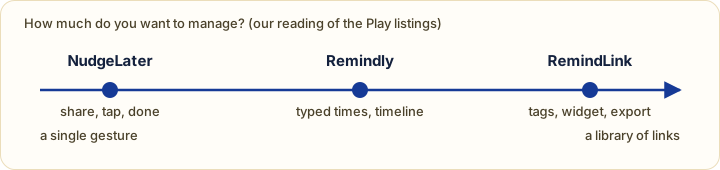
This site is NudgeLater’s, so read the framing with that in mind. Statements about Remindly (com.app.remindly) and RemindLink (com.remindlink.app) come from their Google Play listings on 29 September 2026 and are the developers’ own claims, not tests. Several unrelated apps share the name “Remindly”, so check the package name.
What each is
NudgeLater takes text or a link from the share sheet and shows four time buttons. One tap and it is saved, with an Undo. There are no titles, folders or tags to fill in.
Remindly describes itself as reminders from anywhere via the Share menu, with times such as “in 2 hours”, “tomorrow morning” or “next week”, and a single timeline of upcoming and past reminders that you can search and reschedule.
RemindLink calls itself a bookmark manager and reminder app. Its listing covers a home-screen widget, saving from Quick Settings or selected text, tags and categories, recurring reminders (daily up to yearly, or a custom interval), reminder presets, QR sharing, and free export and import. It can also pick a link and a time out of a pasted message.
Side by side
| NudgeLater | Remindly | RemindLink | |
|---|---|---|---|
| Main idea | Share, tap a time, done | Reminders with natural-language times | Bookmarks with reminders |
| Set the time | Presets or a date and time picker | Typed phrases or custom date and time (per listing) | Presets, or detects a time in shared text (per listing) |
| Notification actions | Open, +1 hour, Done | Not stated | Open, reschedule (per listing) |
| Recurring reminders | Pro (daily, weekly) | Not stated | Yes (per listing) |
| Tags, widget, export | No | Timeline with history search (per listing) | Tags, widget, export, QR (per listing) |
| Ads | One banner in the free app, removed by Pro | “No ads” (per listing) | “No ads” (per listing) |
| Data safety on Play | Anonymous usage and crash reports, can be turned off | “No data collected” | May collect app activity and app info/performance |
| Price | Free; Pro is 2.99 EUR once | Free, in-app purchases | Free |
“Not stated” means the listing does not say, not that the feature is missing.
Where NudgeLater is the odd one out
It gives up features for speed. You cannot type a time in words, cannot tag or file anything, and there is no widget. In return the whole path is share, tap, back to what you were doing, and there is nothing to maintain later.
Where the others are ahead
If typing “tomorrow morning” is more natural to you than choosing a button, Remindly’s model fits. If you collect links and want them organised, with tags, a widget and an export that you can take elsewhere, RemindLink is built for that and NudgeLater deliberately is not. RemindLink’s listing also mentions recurring reminders without any Pro wording; in NudgeLater, recurrence is a Pro feature.
A short guide
- Want the fewest steps and nothing to manage? NudgeLater.
- Want to type times in words and see a timeline? Remindly.
- Keep a real library of links, and want reminders on some? RemindLink.
If you are also weighing general-purpose tools, Keep and Tasks come at the problem from the other side, and the question of accounts versus local storage changes which of these suits you.
Sources
Google Play listings for Remindly (com.app.remindly, updated 29 May 2026) and RemindLink (com.remindlink.app), read on 29 September 2026.
Try it on your phone
NudgeLater is free, takes two taps, and keeps everything on your device.

Keep reading
NudgeLater Pro for 2.99 EUR: what you get, and who can skip it
What stays free in NudgeLater, the six things Pro adds, how the one-time purchase works, and a few plain rules for deciding whether you need it.
Tabs, "later" and the pile that never shrinks: a routine for NudgeLater
A practical routine for capturing things without reading them now, meeting each one once at a time you chose, and keeping the list short. For anyone whose attention gets pulled around.
When a reminder shows up late or never: a four-step check on Android
Why an Android reminder can be delayed or missing, and the four things to check in order: notification permission, battery restriction, manufacturer extras, and precise reminders.