 NudgeLater
Make "Tonight" and "Tomorrow" match your actual day
A default of 20:00 for “Tonight” is a guess about someone else’s evening. If dinner is at 20:00, the notification lands in the wrong moment and gets swiped away, and that is a small failure of the whole idea. Five minutes in Settings fixes it.
The two hours you can change
Open NudgeLater, tap the gear, and look for the Times section. Two rows matter: “Tonight” time and “Tomorrow” time. They start at 8:00 PM and 9:00 AM (20:00 and 09:00 on a 24-hour clock).
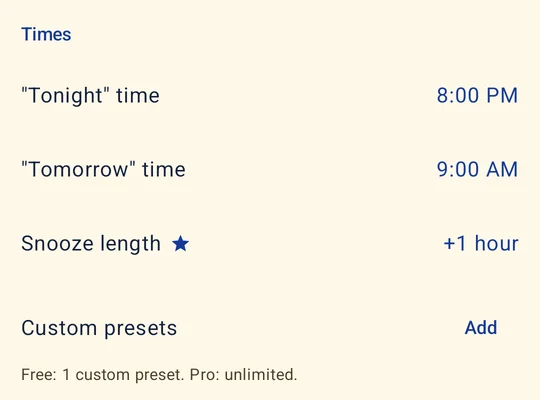
Pick the hour at which you will realistically be sitting down with your phone, not the one you aspire to. A person who commutes by train might set Tomorrow to 07:45. Someone who is never free before 22:00 should set Tonight to 22:00.
When the buttons show up
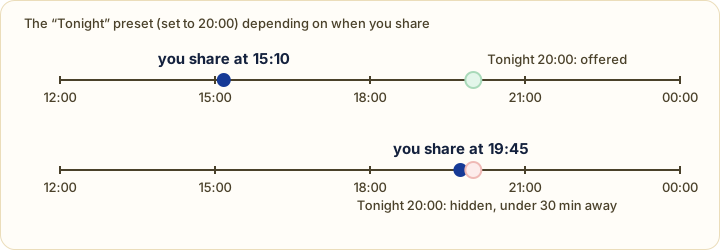
Presets react to the time you are sharing, so what you see changes over the day.
- In 1 hour is always there.
- Tonight is hidden when its time is less than 30 minutes ahead, so nothing fires almost the instant you tap it. Once you are past it, the next reasonable choice is Tomorrow.
- Tomorrow is your Tomorrow time, the next day.
- This weekend means Saturday at 10:00. On a Sunday, or when Saturday at 10:00 is less than 30 minutes away, the label becomes Next weekend and points at the following Saturday.
Anything that doesn’t fit goes through Pick date & time.
Adding your own preset
Under Custom presets, tap Add and choose an hour, such as 12:30 for lunch or 18:00 for when you finish work. It then appears among the buttons in the share sheet. The free version holds one custom preset, and Pro removes the limit.
Snooze
The +1 hour button on a link notification pushes the reminder back 60 minutes. Changing that length is a Pro feature, and the row is labelled as such in Settings. Snoozing itself is free. Text reminders have no snooze at all: their buttons are Copy, Share and Done.
A few habits that help
- Choose times for when you will be free, not for when you’d like to be.
- Leave several hours between Tonight and Tomorrow, or a late-evening share will queue up next to a morning one.
- If a reminder shows up a few minutes late, that is not the preset. By default Android delivers with battery-saving scheduling. The Delivery section of Settings has a Precise reminders option for people who need the exact minute.
Try it on your phone
NudgeLater is free, takes two taps, and keeps everything on your device.

Keep reading
Choosing an Android reminder app in 2026: start from what you keep forgetting
A short guide that sorts Android reminder apps by the job they do, with examples read from Google Play listings, and questions to ask before you install one.
NudgeLater, Remindly and RemindLink: three ways to say "check this later"
Three Android apps that turn a shared link into a reminder, compared from their public Google Play listings. What each is built for and where each one falls short.
Reminder apps with an account, and without: what changes
What an account buys you in a reminder app, what staying on the phone costs, and how to check what any app does with your data before you rely on it.