 NudgeLater
Sharing from YouTube, Reddit, Maps and chats: what you get back
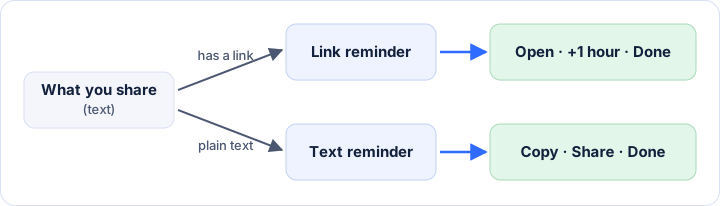
Every Share button ends up handing NudgeLater one thing: a piece of text. Sometimes that text is a link, sometimes it is a sentence you highlighted. The app tells the two apart, and the notification changes to match.
A video for tonight
In YouTube, tap Share under the video, choose NudgeLater, then Tonight. The reminder shows the video title and says it came from YouTube. Tapping Open goes back to the video.
This suits the forty-minute talk that turns up at 11:00 on a Tuesday. Tonight is 20:00 unless you changed it, and it isn’t offered if that time is less than half an hour away.
A post for the weekend
The same on Reddit: Share on the post, NudgeLater, This weekend. The notification arrives on Saturday at 10:00 by default. If you are busy when it does, +1 hour pushes it back and it returns later that morning.
A place for Saturday
From Google Maps, share the place and use Pick date & time to choose the day. The reminder then carries the place’s link, and Open should take you back to it. This works better than a saved place for one thing: a saved place never tells you it is Saturday.
A page from the browser
Chrome and other browsers have Share in the menu. Products, recipes, documentation and news are the usual ones. If the page is a long read that you will want to keep afterwards, see reminder, read-later or bookmark.
Text that isn’t a link
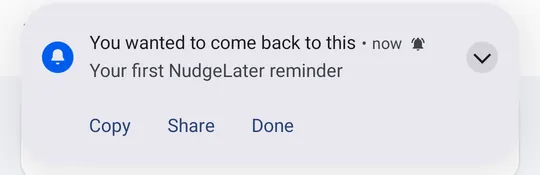
Highlight a sentence in a chat or an email, choose Share, and NudgeLater keeps it as text. When it fires you get Copy, Share and Done. That is handy for a phone number, an address, a booking code, or something someone told you to do on Thursday.
When an app won’t list NudgeLater
Some apps only offer to share images or files, and those are not something NudgeLater takes. If the content has a link, copy it, open NudgeLater and tap the + button. The New reminder screen has a field where you paste a link or write a note, and you then choose the time.
Where it goes
What you share is stored on the phone. There is no account to create and no upload of your content. The privacy policy lists the anonymous usage and crash reports the app can send, which you can switch off in Settings.
Try it on your phone
NudgeLater is free, takes two taps, and keeps everything on your device.