 NudgeLater
Reminder, read-later app or bookmark: which one for what
There is a familiar pile of open tabs, a bookmarks folder nobody has opened since 2022, and a read-later queue with 340 items in it. Each is a decent tool used for a job it was not built for.
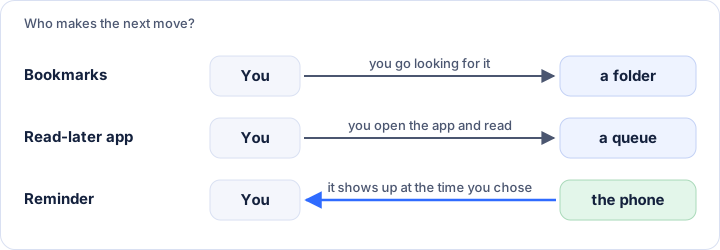
What each one is really for
A bookmark says: keep this where I can find it. Nothing happens until you go looking, which is the right behaviour for a reference you will use again, such as a documentation page, a recipe you cook every winter or a tool you use twice a year.
A read-later app says: put this in a queue. It suits long articles you want to read in a quiet moment, often offline, in a clean layout. The catch is that the queue is passive. It grows more easily than it shrinks, and the backlog itself becomes a reason not to open it.
A reminder says: bring this back at this time. It is the only one that comes to you. It fits anything with a natural moment: a video for tonight, an article for the train on Monday, a product page to look at again after payday, a place to visit on Saturday.
| Bookmark | Read-later app | Reminder | |
|---|---|---|---|
| Good for | Reference you reuse | Long reads, no deadline | Anything with a “when” |
| Who makes the next move | You, when you think of it | You, when you open the queue | The phone, at the chosen time |
| Typical failure | Folders nobody opens | An endless queue | Too many notifications |
| Effort to save | Some (folder, title) | Low to medium | Very low |
Read-later apps differ a lot from one another, so the table describes the usual pattern, not a specific product.
Three questions to ask
- Will I want this again in a month? Bookmark it.
- Is it a long read with no date attached? Read-later.
- Do I need to see it at a particular moment: tonight, Saturday, before a trip? Reminder.
If two answers are yes, the order matters. Something worth keeping but urgent gets the reminder first, and the bookmark afterwards, once you have decided it deserves one.
Where a reminder is the wrong tool
A reminder is not an archive. Anything you would want a year from now belongs in a bookmark; a reminder that has fired and been dismissed is meant to be gone, and its job was to make you decide. And if you are setting twenty a day, the notifications will turn into noise, which is the same failure as the endless queue with a different name.
A workable split
Share the things you plan to deal with soon to NudgeLater, with Tonight or This weekend. When the notification arrives, one of three things is true: you open it and it was worth the time, you realise it is worth keeping and bookmark it then, or you no longer care and tap Done. The reminder acts as a filter, so the bookmarks folder only gets things that survived a second look. The two-tap walkthrough shows the sharing step.
This page is on NudgeLater’s own site, so read the comparison with that in mind. Nothing above depends on using our app; any reminder app fits the third column.
Try it on your phone
NudgeLater is free, takes two taps, and keeps everything on your device.
Keep reading
Keep NudgeLater at the top of Android's share sheet
How to pin an app in Android's share sheet so NudgeLater is always the first icon, and what to do on phones that don't offer pinning.
Remind yourself of a link later on Android, in two taps
Share a link from Chrome, YouTube or Reddit to NudgeLater, tap a time, and get it back as a notification. What each time means and what the notification offers.
Sharing from YouTube, Reddit, Maps and chats: what you get back
What NudgeLater receives when you share a video, a post, a place or a line of text, which times suit each, and what to do when an app won't list NudgeLater.