 NudgeLater
 Pro for 2.99 EUR: what you get, and who can skip it
Sharing a link and getting a reminder is free and stays that way: there is no trial and no time limit. Pro is a single purchase for a handful of extras, and most people will never need them. This page is here so you can tell which side of that you are on.
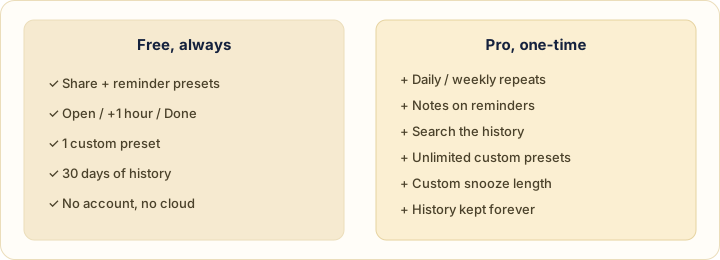
What Pro adds
- Daily and weekly repeats. For a link you want to meet on a schedule: a weekly reading list, a dashboard you check every Monday.
- Notes on a reminder. A line about why you saved it, which is what people forget first.
- History search. To find that thing from three months ago.
- Unlimited custom presets. The free version has one; see how presets are set.
- Custom snooze length. Free snooze is 60 minutes; Pro lets you pick another length.
- History kept forever. Free history is kept for 30 days.
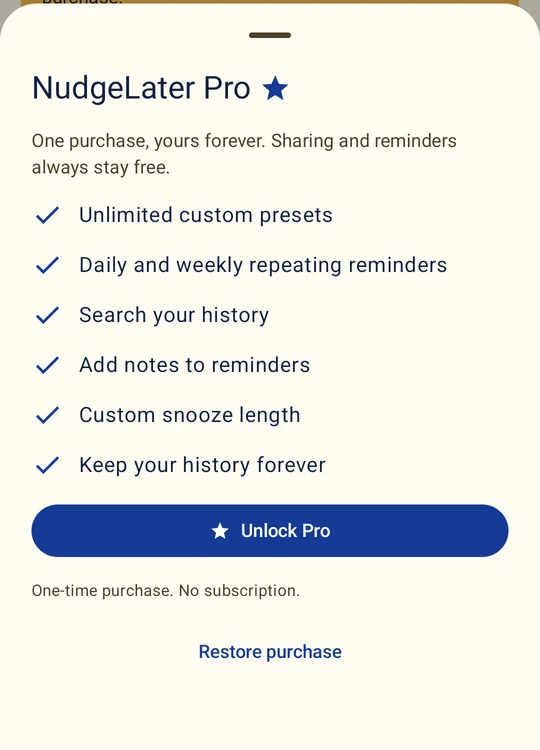
How the purchase works
It is a one-time payment of 2.99 EUR, shown in your local currency by Google Play, and there is no subscription. It belongs to your Google Play account, and the sheet has a Restore purchase button for a reinstall or a new phone. The Pro sheet does not appear before your first reminder has been delivered, so nothing asks you for money before you have seen the app do its job.
Who should buy it
- You want the same link back every week or every day.
- You keep asking yourself why you saved something, and a note would answer it.
- You use NudgeLater as a small reference shelf and need to search it.
- Your snooze is never 60 minutes.
- You like the app and want to pay for it.
Who should not
If your reminders are mostly links you look at once, using Tonight, Tomorrow and This weekend, the free version does the whole job. A Pro feature that you’d use twice a year isn’t worth paying for.
Pro is bought inside the app. The Pro page has the short version.
Try it on your phone
NudgeLater is free, takes two taps, and keeps everything on your device.
Keep reading
Choosing an Android reminder app in 2026: start from what you keep forgetting
A short guide that sorts Android reminder apps by the job they do, with examples read from Google Play listings, and questions to ask before you install one.
NudgeLater, Remindly and RemindLink: three ways to say "check this later"
Three Android apps that turn a shared link into a reminder, compared from their public Google Play listings. What each is built for and where each one falls short.
Reminder apps with an account, and without: what changes
What an account buys you in a reminder app, what staying on the phone costs, and how to check what any app does with your data before you rely on it.